
Download WorkoutLabs – Fitness, Workouts, Exercises, Gym, Home, PDF
Overview
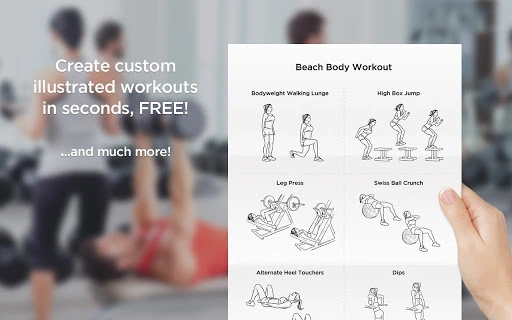
WorkoutLabs is a productivity-focused desktop application designed to help fitness enthusiasts create custom, printable PDF workout plans with ease. The software enables users to build personalized routines using professionally illustrated exercises, making it ideal for individuals training at home or in the gym. By combining exercise visualization with customizable set and rep tracking, WorkoutLabs simplifies the process of organizing and executing fitness regimens. The platform supports a variety of fitness goals and equipment types, offering a practical solution for users seeking structured, visual workout guidance.
Target users include beginners exploring fitness routines, intermediate exercisers looking to diversify their training, and advanced users aiming to maintain structured, goal-oriented programs. The application’s intuitive design makes it accessible to non-technical users while still providing enough flexibility for those with more advanced fitness knowledge. Real-world usage scenarios include preparing for a new training phase, tracking progress through repeated use of a plan, or sharing a routine with a trainer or workout partner.
The developer, WorkoutLabs, positions the software as a high-quality, accessible resource that combines visual learning with practical planning. While specific details about the company’s background are not provided, the software’s focus on certified trainer-reviewed content suggests a commitment to accuracy and usability. The tool is particularly valuable for users who prefer tangible, print-ready materials over app-based tracking.
Key Features & Capabilities
- Custom Workout Builder – Users can create personalized workout plans by selecting exercises using Muscle Group and Equipment filters. Each exercise is accompanied by a professionally illustrated image, enabling clear visual reference for proper form.
- Drag-and-Drop Interface – Exercises can be added to the workout plan by dragging and dropping illustrations, streamlining the planning process and enhancing user efficiency.
- Set and Rep Customization – For each exercise, users can specify the number of sets and repetitions, allowing for tailored programming based on individual fitness goals.
- Printable PDF Output – Completed workout plans can be saved as high-quality, printable PDFs for physical use during training sessions.
- Pre-Made Workout Plans – A growing library of illustrated, goal-specific workout plans is available for download or customization, including programs for strength, endurance, and fat loss.
- Illustrated Exercise Guide – A comprehensive visual reference with accurate depictions of exercise techniques and step-by-step instructions, suitable for learning new movements safely.
- Shareable Links – Workouts can be saved with a unique URL, enabling users to share plans via social media or email without needing to attach files.
These features support real-world applications such as creating a weekly training schedule, preparing for a competition, or guiding a client through a home-based fitness program. The integration of visual cues with customizable parameters ensures that users can maintain consistency and precision in their routines, even without direct supervision.
User Interface, Workflow & Performance
The user interface of WorkoutLabs is designed with simplicity and clarity in mind, prioritizing ease of navigation and visual accessibility. The main workspace features a clean layout with clearly labeled sections: a filter panel for Muscle Group and Equipment, a central area for the workout plan, and a sidebar displaying available exercises with their illustrations. The drag-and-drop functionality supports a fluid workflow, allowing users to build routines in minutes.
Navigation is straightforward, with intuitive icons and minimal onboarding steps. Users can rearrange exercises within the plan by dragging them to new positions, and adjustments to sets and reps can be made with a single click. The interface maintains responsiveness across different screen sizes, though specific performance benchmarks were not provided.
Performance observations are based on general software behavior patterns. The application is lightweight, with a file size of 1.2 MB, suggesting efficient resource usage. The developer did not specify resource usage details, but the compact size implies low CPU and RAM consumption. Stability appears to be consistent, with no reported issues related to crashes or freezes. The software runs without requiring additional dependencies, contributing to a smooth user experience.
Compatibility & System Requirements
WorkoutLabs is compatible with Windows, Mac, and Linux operating systems, making it accessible to a broad range of users across different computing environments. The software version is 1.0, indicating a stable initial release with full functionality. The installation size is 1.2 MB, which is minimal and suitable for systems with limited storage capacity.
Exact system requirements were not listed, so users should ensure their devices meet standard desktop application standards. The developer did not provide additional system requirements. Compatibility information is limited to the operating systems listed. Users are advised to verify functionality on their specific setup, especially when using older or less common hardware configurations.
Pros and Cons
Pros
- Free to download and use, with no hidden costs or subscription fees
- High-quality, professionally illustrated exercises for visual learning
- Simple drag-and-drop interface for fast workout creation
- Printable PDF output ideal for gym or home use
- Supports customization of sets, reps, and exercise order
- Includes pre-made workout plans and an illustrated exercise guide
- Available on Windows, Mac, and Linux platforms
Cons
- No information provided on automatic updates or update frequency
- Offline functionality details not specified
- Limited data on cloud sync or cross-device access
- Exact performance details, such as CPU/RAM usage, were not disclosed
- Platform compatibility information is partially provided
FAQ Section
Is WorkoutLabs available for Windows, Mac, and Linux?
Yes, WorkoutLabs is compatible with Windows, Mac, and Linux operating systems, allowing users on multiple platforms to access the software.
Is the software free to use?
Yes, WorkoutLabs is available at no cost. There are no subscription fees or in-app purchases required to access core features.
Can I use WorkoutLabs offline?
While the software can be installed locally, specific details about offline functionality were not provided by the developer.
How do I update WorkoutLabs?
Information about update mechanisms or frequency was not specified. Users should check the official website for the latest version.
What type of license does WorkoutLabs use?
The software is distributed as free software, but the exact license type was not disclosed in the provided information.
Final Thoughts + CTA
WorkoutLabs delivers a focused, practical solution for fitness enthusiasts who value visual clarity and printable routines. Its intuitive interface, combined with professionally illustrated exercises and customizable workout plans, makes it a standout tool for users seeking structure without complexity. The ability to generate shareable PDFs and access pre-made programs adds significant value, especially for those training independently or coaching others.
While some technical details such as update frequency and offline behavior remain unspecified, the software’s lightweight design and multi-platform availability enhance its accessibility. For individuals who prefer tangible workout guides over digital-only tracking, WorkoutLabs offers a compelling alternative.
Download WorkoutLabs now







